Showing posts with label eSchool Plus. Show all posts
Showing posts with label eSchool Plus. Show all posts
Thursday, November 17, 2011

E, M, and P now shaded in eSchool
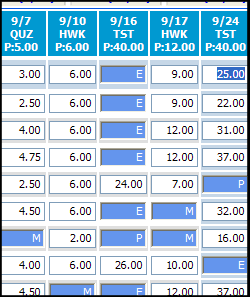 Ah, the power of suggestion. There have been many entries submitted into the eSchool Suggestion Box asking that the E, M, and P alpha marks be shaded or stand out. Well, you asked for it and you got it. Thanks to the magic of Steve Greb, all alpha marks are now shaded blue (cornflower, to be exact) in all grade books. Please note that, currently, the shading only gets added upon the initial opening of the grade book. This means that when you change a score to E, M, or P, the shading will not happen right away. If you exit your grade book and re-open it, the shading will then appear. We'll continue to work on this aspect of the enhancement and see if we can't get the shading to be more dynamic. I hope this helps and you find this enhancement beneficial.
eSchool Question Regarding Students Transferring Classes
Question submitted on 9/15/10:
"When moving students from one class to another is it possible to transfer their grades? Sometimes the student is moved and then we lose the grades before we even know they have been moved."
Response:
There is no way to electronically move scores from one teacher's grade book to another. However, withdrawn students' scores are never really gone, they just don't display by default. To see a dropped student's scores, open the appropriate grade book and then choose an option from the "Show Withdrawn Students" menu near the upper right corner of your window. You can even print these out and share with the new teacher.

Subscribe to:
Posts (Atom)